Settings — Developers
Send signed network events — visits, providers, clients, prescriptions — to an HTTPS endpoint you control, and watch every delivery attempt.
Developers is the settings tab where a Provider Network Admin points network events at an external system: you register HTTPS endpoints, choose which events they receive, and read a log of every delivery attempt.
You do not need this tab for normal GEN Health use. It exists for networks that want visits, providers, clients or prescriptions mirrored into their own CRM, data warehouse or operations tooling.
Questions people ask about this page
Can I subscribe one endpoint to visits and another to prescriptions?
No. The subtitle on Event subscriptions says it: Network-wide: every active endpoint receives the same selected events. Filter on your own side.
I lost the signing secret. Where do I read it again?
You cannot. The dialog warns This secret is shown only once and cannot be retrieved later. Store it securely now. Use the row menu's Rotate secret to issue a new one — and know that the old secret stops working immediately, so deliveries fail verification until you install the new one.
My endpoint says Auto-paused. I did not pause it.
The platform paused it after repeated delivery failures. Fix the receiver, then use the row menu's Re-enable. Anything that arrived while it was paused shows in the delivery log as Skipped (paused).
How many endpoints can I have?
The meta line at the top reads {active} of {max} active · HTTPS URLs only. The default limit is five active endpoints. At the limit Add endpoint is disabled with the tooltip Limit of {max} active endpoints reached. Pause or delete one to add another., and the row menu's Re-enable is disabled with the shorter Limit of {max} active endpoints reached.
Can I resend a delivery that failed?
Yes, for most. Click the row in Delivery log to open Delivery details, then click Replay. The toast reads Replay queued and the dialog closes. Replay is enabled only for event deliveries in Delivered, Failed or Skipped (paused) — a ping is never replayable. Otherwise the button title reads Only completed event deliveries can be replayed.
Is this the same as a Client's API keys page?
No. A Client's Developers tab has API keys, webhooks, analytics and a request log. A provider network's Developers tab has webhooks only — no API keys are issued here. The two also use different words for the same thing: a Client endpoint that is off reads Disabled; a network endpoint that is off reads Paused.
I see a fourth card called API network activity. What is it?
It renders only for networks whose type is api — an external provider network reached through an adapter. It shows Incoming webhooks and Outgoing requests with their payloads. Most networks never see it.
Where to find it
Left menu → Settings → the Developers card. Direct link: /settings/developers. Visible to: Provider Network Admin only.
The card on the Settings index reads Developers — Send network events to external systems with signed webhooks.
What is on this page
| Card | What it does |
|---|---|
| Webhook endpoints | The HTTPS URLs that receive events. Columns Name, Status, Secret, Health, Actions. Header button Add endpoint. |
| Event subscriptions | Twelve events in four groups. Discard and Save appear in the header once you change the selection. |
| Delivery log | Every attempt. Columns Event, Endpoint, Status, Attempts, Last attempt, HTTP. Header button Refresh and an All statuses filter. The All endpoints filter only appears once you have at least one endpoint, and Load more only appears when there is another page. Clicking a row opens Delivery details. |
| API network activity | Only for networks of type api. Tabs Incoming webhooks and Outgoing requests. |
How to add an endpoint
Open the page
Left menu → Settings → Developers.
Start one
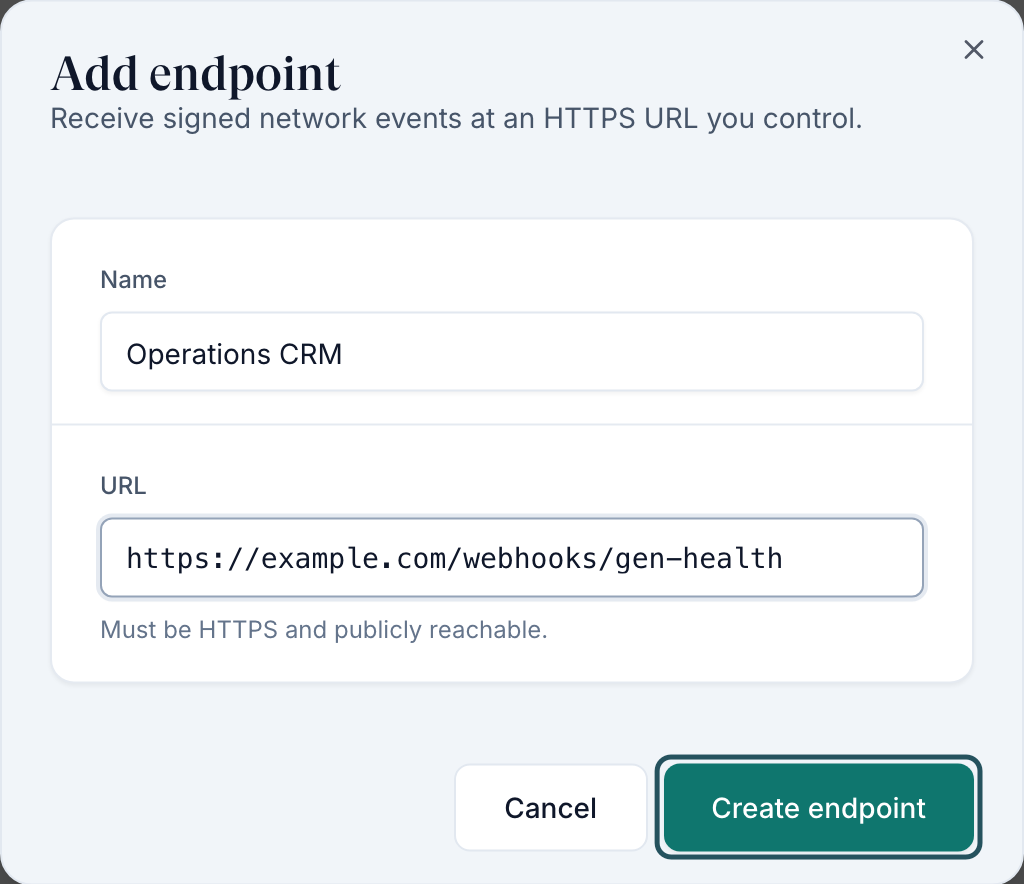
Click Add endpoint. On an empty network the same button sits inside the card under No endpoints yet and Add an HTTPS endpoint to start receiving signed network events.
Name it
Name — placeholder e.g. Production CRM. This is what appears in the table and in the delivery log.
Give it a URL
URL — placeholder e.g. https://example.com/webhooks/gen-health, helper Must be HTTPS and publicly reachable. Plain HTTP is rejected with Endpoint URL must use HTTPS.
Create it
Click Create endpoint. The toast reads Endpoint created.
Copy the secret now
The Signing secret dialog opens: Use this secret to verify webhook signatures. Click Copy — it changes to Copied and the toast reads Signing secret copied to clipboard. Store it, then click Done. You cannot read it again. After a rotation the same dialog is titled New signing secret and names the endpoint: Use this secret to verify webhook signatures from {endpoint}.
How to choose which events go out
Tick the events
In Event subscriptions, tick individual events or use a group's Select all / Clear all toggle.
Save
Discard and Save appear in the card header once the selection is dirty. Click Save. The toast reads Event subscriptions updated.
| Group | Event | Description shown |
|---|---|---|
| Visits | visit.created | A new visit was scheduled or started. |
| Visits | visit.updated | A visit's details or status changed (includes changed_fields). |
| Visits | visit.deleted | A visit was deleted. |
| Providers | provider.created | A provider joined the network. |
| Providers | provider.updated | A provider's profile or status changed. |
| Providers | provider.deleted | A provider was deleted. |
| Clients | client.created | A client was added to the network. |
| Clients | client.updated | A client's details or status changed. |
| Clients | client.deleted | A client was deleted. |
| Prescriptions | prescription.created | A prescription was created during charting. |
| Prescriptions | prescription.updated | A prescription's status changed. |
| Prescriptions | prescription.deleted | A prescription was deleted. |
How to test, pause, rotate, or delete
Open the row menu
Click the actions button on the endpoint row — Open actions for {name}. It holds Edit, Send test, Pause or Re-enable, Rotate secret, and Delete.
Send a test
Send test fires a ping. You see Sending test to {name}..., then either Test delivered (HTTP 200 · 431ms) or Test failed (HTTP 500) with The receiver did not accept the request.
Pause instead of deleting
Pause stops delivery but keeps the endpoint and its secret. Deliveries during a pause are logged as Skipped (paused) and can be replayed later.
Rotate the secret
Rotate secret asks Rotate signing secret? — The current secret for {name} stops working immediately. Deliveries signed with the old secret will fail verification until you install the new one. Have the new secret ready to deploy before you confirm.
Delete only when you are sure
Delete endpoint? — {name} stops receiving events immediately. This cannot be undone.
Every setting on this page
| Setting | What it controls | Default |
|---|---|---|
| Name (endpoint) | The label shown in the table and the delivery log. | Empty; required |
| URL (endpoint) | Where signed events are posted. HTTPS and publicly reachable. | Empty; required |
| Endpoint Pause / Re-enable | Whether this endpoint receives events. | Active on creation |
| Rotate secret | Issues a new signing secret and invalidates the old one immediately. | — |
| Active-endpoint limit | How many endpoints can be active at once. Server-provided; the client shows five. | 5 |
| Event subscriptions | Twelve checkboxes in four groups, each group with Select all / Clear all. Applies to every active endpoint. | Nothing selected |
| Delivery log filters | All endpoints and All statuses (Delivered, Failed, Pending, Published, Skipped (paused)). | Unfiltered |
| Refresh / Load more | Reload the log, or page further back. The meta line reads {n} shown, and {n} shown · more available when another page exists. Load more is hidden when there is nothing more. | — |
Statuses you will see here
| Status | What it means | What to do |
|---|---|---|
| Active | The endpoint is receiving events. | Nothing. |
| Paused | An admin paused it. | Re-enable from the row menu when you are ready. |
| Auto-paused | The platform paused it after repeated failures. | Fix the receiver, then Re-enable. |
| Pending (delivery) | Queued, not attempted yet. | Wait, then Refresh. |
| Published (delivery) | Handed to the delivery pipeline. | Wait for Delivered or Failed. |
| Delivered (delivery) | Your endpoint accepted it. | Nothing. |
| Failed (delivery) | Your endpoint rejected it or did not answer. The detail dialog shows an Error: box. | Open the row, read the error and HTTP status, fix the receiver, then Replay. |
| Skipped (paused) (delivery) | The event happened while the endpoint was paused. | Re-enable the endpoint, then Replay what you need. |
| Unknown (delivery) | A status the screen does not recognise. | Open the row and read the raw fields. |
The endpoint Health column is not a status — it shows {n} sent · {n} failing and Last delivery {relative time}. The Secret column shows a masked tail and a version, for example •••• 1234 v1.
What can go wrong
| What you see | Why | Fix |
|---|---|---|
| Endpoint URL must use HTTPS. | You entered an http:// URL. | Use HTTPS. There is no exception for localhost or internal hosts. |
| Enter a valid URL. / Endpoint name is required. / Endpoint URL is required. | The form is incomplete. | Fill both fields and try again. |
| Add endpoint is greyed out. | You are at the active-endpoint limit. | Pause or delete one, then add the new one. |
| Your receiver rejects everything after a rotation. | The old secret stopped working the moment you confirmed. | Deploy the new secret. Rotate only when you can ship the new value immediately. |
| Unable to copy. Select the secret and copy it manually. | Clipboard access was blocked. | Select the secret text in the dialog and copy it by hand before clicking Done. |
| Nothing in the delivery log. | Either no events are subscribed, or no endpoint is active. Empty text: No deliveries yet. Deliveries appear here once events are sent to your endpoints. | Check Event subscriptions has boxes ticked and saved, and that an endpoint reads Active. |
| Replay is disabled. | The row is not a completed event delivery — a ping, for example. | Nothing. The button title says Only completed event deliveries can be replayed. |
| Unable to load webhook endpoints. / Unable to load event subscriptions. | The load failed. | Reload the page. Do not assume an empty list means nothing is configured. |
Next
Was this helpful?