Forms and consents
Build the intake and consent forms patients complete, plus the forms your own providers and your clients' staff have to sign.

This is where a Provider Network Admin writes the forms in the network — patient intakes and consents, plus forms your own providers, delegates, and linked client staff must sign.
Questions people ask about this page
Why can't I see a form I know exists?
The Active status filter is switched on by default on every tab, so drafts and retired forms are hidden until you change it. Click the status filter and add Draft or Inactive. Clicking Clear filters does not clear it — it resets back to Active.
What is the difference between Save Draft and Publish Form?
Save Draft stores the form with status Draft. A draft can never be attached to a protocol and no patient will ever see it. Publish Form makes it Active, which is the only state that appears in a protocol's Required forms picker. Publishing does not attach the form to anything by itself.
A patient answered this last month — will they be asked again?
That is the Answer Reuse column. Click the value in the row to open the Answer Reuse popover and choose Require every time, Platform default (30 days), or Valid for a custom window with your own number of days. Consent forms ignore this — their column reads Current version, meaning a signature stays valid until you publish a new version of the form.
What does the "Intake forms needed" banner mean?
It lists protocols that are active for a client but have no intake form attached, so neither the client nor its patients can see them. Assign an intake form to each protocol listed. Items drop off as you fix them, and the whole banner hides when the list is empty.
Is there an Import button on this page?
No. Import-from-another-network exists in the code but is switched off for this page, so there is no Import control for a Provider Network Admin today. Your real starting points are Add → Create it on your own, Add → Upload a PDF, and Duplicate on an existing row.
Can I link to a specific tab?
No. The four tabs are not in the URL. The only link is /forms and it always opens on Patient Intakes. Switching tab also clears the search box and the filters.
Do Providers get this page?
No. Forms is Provider Network Admin only — Providers and Provider Delegates have no Forms item in the left menu. They meet submitted answers inside a patient record or the visit charting modal instead.
What does the Knowledge Base column do?
It links reference documents to the form so a reviewing provider can see them beside the answers. Click the {n} items value to open Link Knowledge Base, tick documents, and click Save Links. It has no effect on the patient.
Where to find it
Left menu → Forms. Direct link: /forms. Visible to: Provider Network Admin only. The heading reads Forms with the line Create and manage forms for your provider network.
What is on this page
| What you see | What it does |
|---|---|
| Patient Intakes tab | Questionnaires patients complete before a clinical decision. Tooltip: These are intake forms for patients. Table card: Intake Forms. |
| Patient Consents tab | Documents patients sign. Tooltip: These are consent forms patients need to sign. Table card: Consent Forms. |
| Provider Network Forms tab | Forms your own Providers and Provider Delegates must sign. Empty state: No provider network forms yet with the button Create Provider Network Form. |
| Client Forms tab | Forms Client Admins and Client Staff at your linked clients must sign. Empty state: No client forms yet with the button Create Client Form. |
| Add | Opens the Create Form dialog — Do you want to upload a PDF or create it on your own? |
| Export CSV | Downloads the current table. |
| Search box | Placeholder Search forms.... Resets when you change tab. |
| Status filter | Default label All Statuses, but Active is preselected. Options Active, Inactive, Draft. |
| Associations filter | Intake and consent tabs only: All protocols, Targeted, Unassigned. |
| Audience filter | Network tab: Providers, Provider Delegates, No audience. Client tab: Client Admin, Client Staff, No audience. |
| Knowledge base filter | Intake and consent tabs: KB linked, No KB. |
| Table columns | Status · Form Name · Questions · Protocols (or Audience on the network and client tabs) · Answer Reuse · Knowledge Base · Created · Last Updated · Actions. Empty: No forms found. |
| Row menu (...) | View · Edit · Duplicate · Set to Draft · Deactivate / Activate · Delete. Clicking the row itself opens View. |
How to build an intake form from scratch
This is the whole job, end to end. Follow it once and you have a live form attached to a protocol.
Open the right tab
Go to /forms. It lands on Patient Intakes. The tab you are on decides the type of form you create — there is no type picker inside the builder.
Start a new form
Click Add at the top right of the Intake Forms card. The Create Form dialog opens: Do you want to upload a PDF or create it on your own?
Choose the blank path
Click Create it on your own — Start from a blank form and build it section by section. The builder opens as a full dialog titled Create Intake Form.
Name it
Click the title, which reads New Intake Form, and type the real name. Then click Click to add description... and write one sentence saying what clinical decision the form supports.
Name the first section
The left rail shows SECTIONS with Section 1 and 0 questions. Click the section title in the main pane and rename it, for example Health history.
Add your first question
Click Add Question. The ADD QUESTION editor slides in, showing the section name and a QUESTION TYPE grid.
Pick a type
Click a tile in QUESTION TYPE — for a yes/no history question, Radio.
Write the question
Type into QUESTION LABEL (placeholder e.g., What is your name?). Keep it to one concept and state units or time ranges explicitly.
Add the answer options
For Dropdown, Radio, and Checkbox an Options list appears. Type into Add option... and press Enter for each choice. Saving with no options fails with Please add at least one option.
Make it required
Turn on the Required field toggle if a patient must answer before they can submit.
Open Additional Options if you need them
Expand Additional Options for the placeholder text (e.g., Enter your answer here) and help text (e.g., This information is confidential). For a text question you also get Numbers Only — Only allow numeric input (0-9) — and Exact Character Length (Optional) — Require the answer to be an exact number of characters (e.g., 9 for DEA, 10 for NPI).
Add a disqualifier if the answer should stop the patient
Under DISQUALIFIERS — Block completion when the answer matches this text rule. — choose the operator (equals) and type the value into Text that disqualifies. On a Date question the rules become Date is within the last, Patient is younger than, and Patient is older than.
Save the question
Click Add Question at the bottom of the editor. It appears in the section and the counter updates. Undo is disabled while an editor is open — the header says Undo is paused while a question is open.
Add a follow-up that only shows for one answer
On an option-based question, attach a child question to a specific answer. Until the parent has options the builder says Add options first, then attach follow-up questions to a specific answer. Moving follow-ups between answers asks Move these follow-up questions? with the confirm Move follow-ups.
Add more sections
Click Add Section for each logical group. The rail shows Section {n} of {total} and a completion percentage as you go.
Preview it as a patient
Click Preview in the footer and read every question back. Fix anything ambiguous now — editing a published form creates a new version for everyone.
Save a draft, or publish
Save Draft (spinner label Saving...) stores it as Draft. Publish Form (Publishing...) makes it Active. Publishing refuses with Form name is required, Form must have at least one section, or Form must have at least one question.
Set answer reuse
Back in the table, click the value in the Answer Reuse cell. The popover explains: How recent a patient's previous submission must be to satisfy this form on a new order or intake. Pick Require every time (Never reuse a previous submission), Platform default (30 days) (Reuse submissions from the last 30 days), or Valid for a custom window — type a number of days and click Apply. Toast: Answer reuse updated.
Attach it to protocols
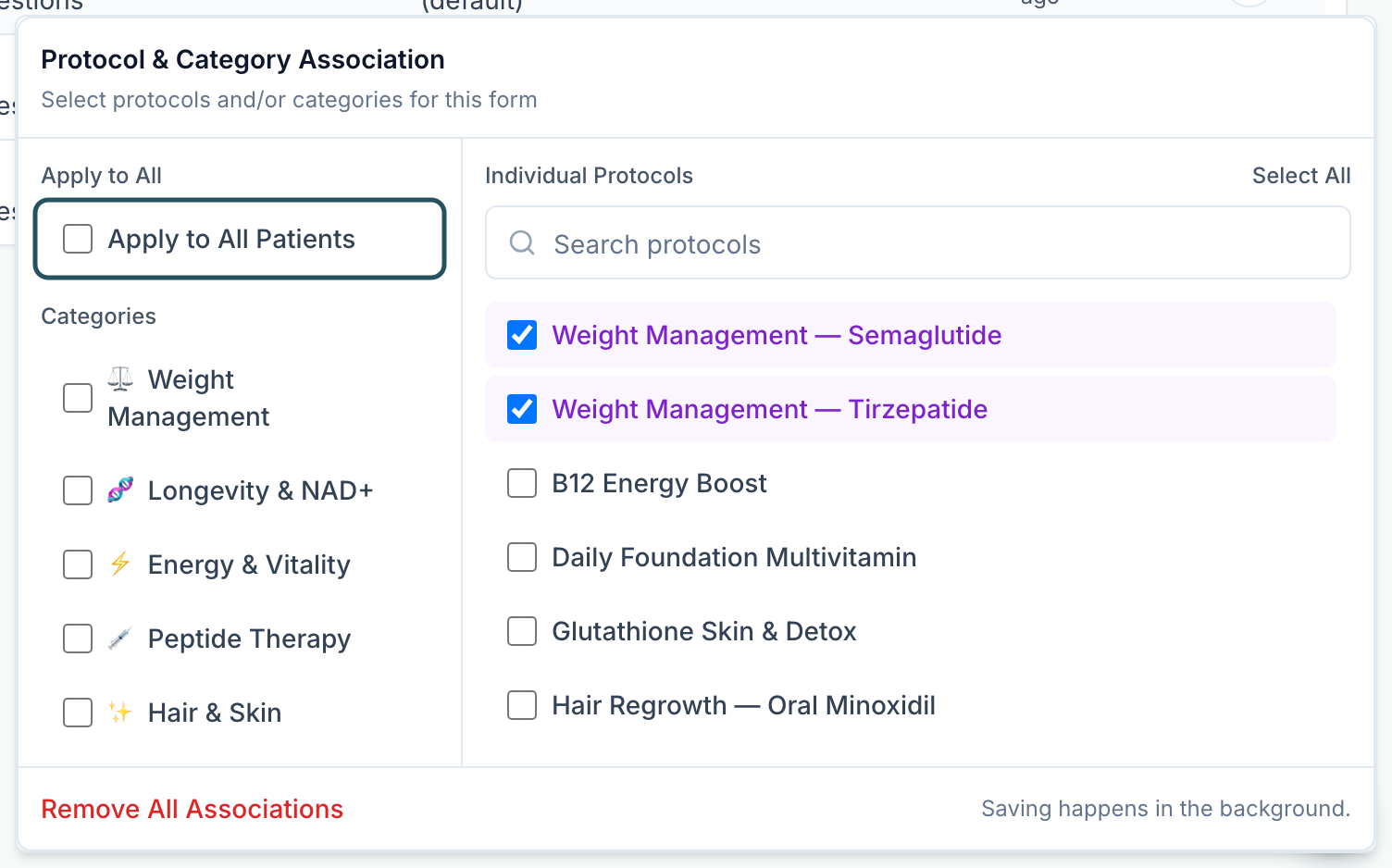
Click the value in the Protocols cell. The Protocol & Category Association popover opens — Select protocols and/or categories for this form. The left rail holds Apply to All Patients and a Categories list; the right pane lists individual protocols with a search box.
Confirm the row
The Protocols cell now reads All protocols or {n} protocols, the Status toggle is on, and the form is live for the protocols you picked.
Every question type you can add
Fourteen tiles, in the order they appear in QUESTION TYPE.
| Type | Use it for |
|---|---|
| Short Text | One-line free text. Supports Numbers Only and Exact Character Length. |
| Long Text | Multi-line free text, for a symptom description or history narrative. |
| Rich Text | Formatted copy you write and the patient reads — headings, bold, lists. Fails to save with Rich text content is required if left empty. |
| HTML Embed | A third-party embed, such as a scheduling widget. Placeholder: Paste a Calendly URL or iframe/embed snippet. |
| Raw HTML | Full HTML, CSS, and JavaScript block. Placeholder: Paste full HTML, CSS, and JavaScript. Use sparingly. |
| Email address with validation. | |
| Phone | Phone number with validation. |
| Date | Date picker. Unlocks the date disqualifiers Date is within the last, Patient is younger than, Patient is older than. |
| BMI | Height and weight capture that computes BMI, and can drive a display rule on follow-up questions using BMI rule measurement, BMI rule operator, and a value or range. |
| Dropdown | Single choice from a long list. Needs at least one option. |
| Radio | Single choice from a short list, all options visible. Needs at least one option. |
| Checkbox | Multiple choice. Needs at least one option. |
| Patient Data Field | Writes the answer onto the patient record instead of only the submission — use it for demographics you want on the chart. |
| File Upload | Attachment. Preview copy: File upload — patient attaches a PNG, JPG, HEIC, or PDF. |
The other four ways to create a form
Draft one from a PDF or image
Add → Upload a PDF — Generate a draft {intake|consent|provider network|client} form from an existing PDF or image. It produces a draft you still have to read, correct, and publish. If it fails you get the toast We couldn't generate that form. Please try again.
Draft one with Ask AI
Inside the builder, click Ask AI in the top-left of the dialog and describe the form you want. It writes questions into the current form; nothing is published until you press Publish Form.
Duplicate an existing form
Row menu ... → Duplicate. The copy is named {original name} (Copy) and toasts Form duplicated successfully. Open it, rename it, edit, publish. This is the fastest route to a variant.
Create a form your own staff must sign
Switch to Provider Network Forms and click Create Provider Network Form (or Add). Once it is published, click Click to assign in the Audience cell to open Audience Selection — Select who needs to sign this form — and pick Providers (Required for all Providers), Provider Delegates (Required for all Provider Delegates), or Remove Audience. The Client Forms tab works the same way with Client Admin and Client Staff.
Every setting on this page
| Setting | What it controls | Default |
|---|---|---|
| Status toggle in the row | Active ↔ inactive. A draft shows a Draft badge with no toggle. | Whatever you saved it as |
| Answer Reuse | How recent a previous submission must be to satisfy this form again. | 30 days (default); consents read Current version |
| Protocols association | Which protocols and categories this form applies to, or all patients. | Unassigned |
| Audience | Which staff role must sign a network or client form. | Click to assign — none |
| Knowledge Base | Reference documents shown to reviewers alongside the answers. | 0 items |
| Required field (per question) | Blocks submission until the question is answered. | Off |
| Numbers Only (per question) | Restricts input to digits. | Off |
| Exact Character Length (per question) | Forces an exact answer length — 9 for a DEA, 10 for an NPI. | Empty |
| DISQUALIFIERS (per question) | Blocks completion when the answer matches the rule. | None |
Statuses you will see here
| Status | What it means | What to do |
|---|---|---|
| Draft | Never published. Slate badge, and the status toggle is hidden. Cannot be attached to a protocol and no patient will ever see it. | Open Edit and click Publish Form when the content is approved. |
| Active (toggle on) | Live. Appears in a protocol's Required forms picker and is served to patients wherever it is associated. | Nothing. |
| Inactive (toggle off) | Retired but not deleted. Stops being served; history is kept. | Activate from the row menu to bring it back. |
| All protocols | Association cell — the form applies to every protocol in the network. | Narrow it if that was not intended. |
| {n} protocol / {n} protocols | Association cell — targeted to that many catalogue items. | Click to change the targeting. |
| Click to assign | Audience cell on a network or client form — nobody has to sign it yet. | Click and choose an audience, or the form does nothing. |
| Every time | Answer Reuse — the patient re-answers on every order. | Nothing. |
| {n} days | Answer Reuse — answers are reused inside that window. | Nothing. |
| 30 days (default) | Answer Reuse — no explicit policy set, so the platform default applies. | Set one deliberately for clinically time-sensitive questions. |
| Current version | Answer Reuse on a consent — a signature stays valid until a new version of the form is published. | Nothing. Publishing an edit re-asks everyone. |
| {n} items | Knowledge Base — that many reference documents are linked. | Click to change. |
What can go wrong
| What you see | Why | Fix |
|---|---|---|
| Banner: Intake forms needed — {n} client(s) have active protocols without intake forms. | A protocol is active for a client but nothing collects the patient's answers, so the protocol is invisible to that client and its patients. | Attach an active intake form to each protocol listed. The banner clears itself. |
| Your new form is not in a protocol's Required forms list | It is still a Draft, or you built it on the wrong tab. Only active intake and consent forms appear there. | Publish it, and check it is on Patient Intakes or Patient Consents rather than a staff tab. |
| Form must have at least one question | You pressed Publish Form on an empty section. | Add a question, or use Save Draft to keep the shell. |
| Please add at least one option | A Dropdown, Radio, or Checkbox question with no answers. | Add options in the Options list before saving the question. |
| A follow-up question has vanished from the form | Its parent answer was renamed or deleted, so it is orphaned. The error names the question and points at an Unassigned follow-ups group. | Reattach it to an existing answer in that group, then save. |
| You're offline. Publishing requires an internet connection. | You lost connectivity mid-edit. | Use Save Draft — it stores locally with Draft saved on this device. It will sync when you're back online. Publish once you reconnect. |
| Deleting a form asks in a plain browser box | Delete uses the browser's own confirm — Are you sure you want to delete "{name}"? — not a styled dialog. It is easy to click through by accident. | Prefer Deactivate for anything that has ever been submitted. Deletion loses the definition. |
| You cannot deep-link a colleague to the Consents tab | The tabs are local state, not URL state. | Send /forms and tell them which tab. There is no other option today. |
| Editing a live form re-asks patients who already answered | Publishing an edit creates a new version. For consents, every prior signature stops being current. | Batch your edits and publish once. Use Duplicate to trial a rewrite without touching the live form. |
| You expected an Import button | Import-from-another-network is disabled on this surface. | Use Duplicate, or ask GEN Health support if you genuinely need a bulk copy between networks. |
Next
Was this helpful?