ScriptSure e-prescribing
Create your network's ScriptSure practice, enrol every prescriber, and read the fourteen enrolment statuses so you know who is actually able to prescribe.

ScriptSure is the external e-prescribing system GEN Health launches for prescribing. This page is where a Provider Network Admin creates the network's ScriptSure practice and enrols the people who will use it.
Two stages, in order. First you create one ScriptSure practice for the network by sending yourself a setup invite and completing it in your email. Only then can you invite anyone else. Sending an invite is never the same as someone being able to prescribe.
Questions people ask about this page
I sent a provider an invite. Why still can't they e-prescribe?
An invite is one of five things that must all be true. The network's ScriptSure practice must exist, the provider must finish the ScriptSure account flow, they must pass ID.me identity proofing, their status must reach Verified, and they must be licensed in the patient's state. Check the provider's row in the ScriptSure users table — the Enrollment Status column names exactly which of those is missing.
A provider is stuck on Pending Verification and nothing is happening.
This is the single most common stall, and it is expected. ScriptSure does not send GEN Health a notification when ID.me approves someone. The status only moves when it is polled. Click Check status on that row to poll immediately. GEN Health also re-polls automatically whenever a status is read, but throttled to once per ten minutes per person — so clicking twice in a row changes nothing.
Resend or Send fresh invite — which one?
Resend re-emails the same link and is right when the provider simply lost the email. Send fresh invite mints a new link and is required when the old one is dead — Invite Expired, Invite Revoked, Rejected, or Role Update Required. An expired or revoked link is never reused, so resending it achieves nothing.
Where are the Network Admins and Providers tabs?
They no longer render. Older instructions told you to use separate Network Admins and Providers tabs; that tab strip is switched off. Once the practice is connected there is one ScriptSure users table holding providers and delegates together, filtered by the Enrolled / Pending / Not invited chips.
Can I choose who receives the first setup invite?
No. Start ScriptSure setup always sends the invite to you, the admin clicking the button. There is no picker. Whoever completes it becomes the network's ScriptSure basic admin, so the right person has to be the one at the keyboard.
Can we use our own ScriptSure account?
No. ScriptSure is configured entirely by GEN Health. There is deliberately no credentials form on the ScriptSure row, and the network's ScriptSure record is written by the integration itself, not by a person.
Can our providers send controlled substances?
Only conditionally. Controlled e-prescribing (EPCS) needs a DEA auditor review at the platform level and a DEA number on the prescriber's ScriptSure identification page. If a prescriber's ScriptSure invitation was configured as "Do Not Allow Controlled Substances", the DEA field is removed for them and they can never sign up for controlled sending.
Does a Provider Delegate need to enrol?
Not to open a chart. A delegate can launch the ScriptSure chart as long as the prescriber is verified — GEN Health signs in using the prescriber's ScriptSure identity and records the delegate separately in its own audit trail. A delegate can only ever be invited as a basic admin (a ScriptSure "supporting user"), never as a prescriber.
Where to find it
Left menu → Integrations (/integrations) → the Tools section → the ScriptSure row. Direct link straight into the modal: /integrations?scriptsure_setup=1. Add &scriptsure_provider=<userId> to open on a specific person. Visible to: Provider Network Admin. Providers see the same row but get Open ScriptSure or a status badge instead of setup controls. A Practice tenant sees only the note E-prescribing (ScriptSure) is configured by your provider network.
What is on the ScriptSure row
| What you see | What it does |
|---|---|
| Row title ScriptSure | Description: ScriptSure e-prescribing widget integration for provider prescription launch. |
| Switch (Enable ScriptSure / Disable ScriptSure) | Turns the integration on for the network. It must be on before anything else works. |
| Set up | Accent-filled button before a practice exists. Opens Set up ScriptSure. |
| Manage setup | The same button after a practice exists, outlined instead of filled. |
| Practice connected | Green badge beside the button once the ScriptSure practice exists for your network. |
| Open ScriptSure | Only rendered for a Provider or Practice Provider whose enrolment is complete. Opens ScriptSure in a new tab. |
| No Credentials button | Deliberately suppressed for ScriptSure. A network never holds its own ScriptSure credentials. |
Before you start
The Start ScriptSure setup button is disabled while anything below is missing, and the blockers are listed in red directly above it. Fix them first and you save yourself a failed attempt.
| Requirement | Where it lives |
|---|---|
| The ScriptSure switch is on for your network | The ScriptSure row itself. |
| Your own first name, last name, and email — plain ASCII, no asterisk, within 35 / 35 / 80 characters | Your account settings. |
| A valid 10-digit phone number reachable for the network | Settings → Network overview. It falls back to a Provider Network Admin's own phone. |
| The network's address line 1, city, state, and ZIP | Settings → Network overview. These create the ScriptSure practice; fax defaults to the phone. |
| GEN Health has activated ScriptSure for your network | Platform-side. If the row is missing entirely, raise a ticket. |
For each prescriber you will later invite: their user type must be Provider, they must have an NPI of exactly 10 digits, their name and email must be plain ASCII with no asterisk, and their account must be active. Inactive users are filtered out of the table entirely.
How to create the network's ScriptSure practice
Open Integrations
Click Integrations in the left menu. The page shows three sections: Pharmacies, Labs, Tools.
Find ScriptSure
Scroll to Tools and find the ScriptSure row.
Make sure it is switched on
The row's switch reads Enable ScriptSure when off and Disable ScriptSure when on. Turn it on.
Open the setup modal
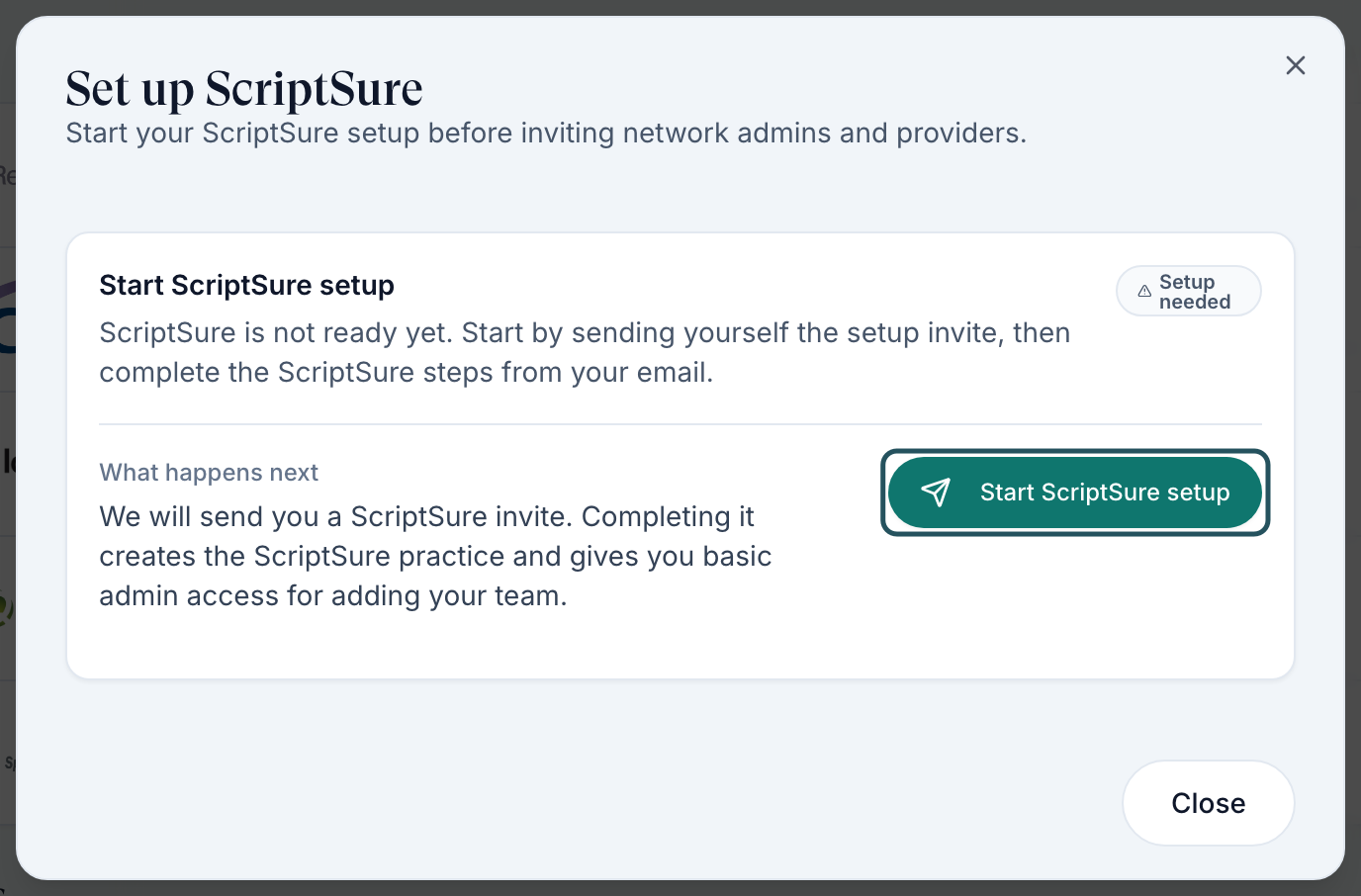
Click Set up. The dialog Set up ScriptSure opens — Start your ScriptSure setup before inviting network admins and providers.
Read the start card
The card is headed Start ScriptSure setup with a slate badge reading Setup needed: ScriptSure is not ready yet. Start by sending yourself the setup invite, then complete the ScriptSure steps from your email. Below it, What happens next — We will send you a ScriptSure invite. Completing it creates the ScriptSure practice and gives you basic admin access for adding your team.
Clear any blockers
If Start ScriptSure setup is greyed out, a red bulleted list sits above it naming exactly what is missing — most often the network phone number or a non-ASCII character in a name. Fix those, reopen the modal, and the button enables.
Send the invite to yourself
Click Start ScriptSure setup. Toast: Practice setup invite sent. The badge changes to a yellow Invite sent.
Follow the instructions the card now shows
A Next step block appears: Open the ScriptSure setup email sent to {your email} and finish the account setup. After ScriptSure confirms setup, return here to invite network admins and providers. It lists three steps — Check email / Find the ScriptSure invite., Complete setup / Create the ScriptSure practice., Add users / Invite admins and providers here.
Complete it in ScriptSure
The email subject is Set up ePrescribe - {your network name} and its button reads Start ScriptSure Setup. Work through ScriptSure's own pages — eligibility, user, email confirmation, password, identification, practice, payment, agreement — until ScriptSure confirms.
If the email never arrives
Use Copy invite link and open the link yourself, or Resend invite (toast Practice setup invite resent). Do not start a second setup — you will hit A ScriptSure practice setup invite is already pending for this provider network.
Come back and confirm
Reopen the modal. The description changes to Manage provider and delegate enrollment in ScriptSure., the row gains a green Practice connected badge, and the button becomes Manage setup. Do not invite anyone before you see this.
How to enrol a prescriber
Open the users table
Click Manage setup on the ScriptSure row. The card is headed ScriptSure users with a green Connected badge — Invite providers and delegates, then monitor their enrollment from one place.
Find the person
Use the search box (Search name, email, role, status, or ScriptSure ID) or click one of the Enrolled / Pending / Not invited chips to filter. The table columns are User, Role, Enrollment Status, ScriptSure ID, and Actions.
Invite them as a prescriber
Click Invite as provider on their row. Toast: Provider invite sent. Use Invite as basic admin instead for a Provider Delegate or an administrator who needs access but will not write prescriptions.
If the button is disabled
Hover it. An active invite or ScriptSure mapping already exists. means they are already in flight — use Check status or Resend. Any other tooltip is the list of readiness blockers, usually a missing or malformed NPI. The refusal toast is Resolve readiness blockers before inviting this provider.
Tell them what to expect
Their email subject is Set up ePrescribe - {your network name} and the body lists four steps: open the secure ScriptSure setup link, confirm their profile details, complete ScriptSure account setup, and complete ID.me proofing when prompted. The proofing step is the one people abandon.
If the email could not be sent
The toast reads Invite created, but its email could not be queued. Copy the invite link to send it directly. Click Copy link on the row and send it yourself. Treat the link as a credential — it is single-use and personal.
Poll for the result
After they say they are done, click Check status. Toast: ScriptSure status checked. The row should move to Verified and the ScriptSure ID column should stop reading Not set.
Confirm they can actually launch
Ask the provider to open /integrations. If their ScriptSure row shows the button Open ScriptSure rather than a status badge, they are ready. That is the real test.
Every enrolment status
These are the labels the backend sends, which is what the table actually renders. Some of them read differently on a provider's own Integrations row; where that happens it is noted.
| Status | What it means | What to do |
|---|---|---|
| Not Invited | No invite and no ScriptSure identity. Shown to the provider as Not set up. | Click Invite as provider or Invite as basic admin. |
| Blocked | Readiness blockers stop the invite — most often a missing or non-10-digit NPI, a non-ASCII character in a name, the practice not being initialised, or the integration being off. Shown to the provider as Needs admin review. | Hover the badge for the blocker list, fix each one on the provider's record, then invite. |
| Invite Sent | The link was minted and the email queued. | Wait for them to open it. Chase after a day. |
| Invite Resent | The same link was emailed again. | Same. If two resends do nothing, use Copy link and send it directly. |
| Account Created | A ScriptSure user exists but is not yet mapped to a prescriber identity. | They have not finished the ScriptSure flow. Ask them to complete it, then Check status. |
| Proofing | They are part-way through ID.me identity proofing. | Nothing you can do. Only they can finish it. |
| Pending Verification | A prescriber identity exists but ID.me has not approved it. ScriptSure never notifies GEN Health when proofing is approved, so this status does not clear on its own. | Click Check status. The automatic re-poll is throttled to once every ten minutes. |
| Verified | Prescriber identity mapped and identity approved. This is success. | Nothing. They can prescribe. |
| Ready | Enrolment is complete on the GEN Health side. Same success family as Verified. | Nothing. |
| Role Update Required | A ScriptSure account already exists for that email but it is not flagged as a prescriber. The row shows the amber hint Enable Prescriber for this account in ScriptSure. The provider's own row calls this Prescriber access needed. | Enable Prescriber on that ScriptSure account, or click Send fresh invite — the old invite is superseded. |
| Invite Expired | The link's validity window has passed. | Send fresh invite. Expired links are never reused, so Resend will not help. |
| Invite Revoked | The link was pulled upstream. | Send fresh invite. |
| Rejected | ScriptSure or its identity provider refused the identity — a denied or failed proofing result, or a fraud flag. | The provider must resolve it with ScriptSure and ID.me directly. Then Send fresh invite. You cannot override it. |
| Inactive | The upstream ScriptSure account is inactive. | Contact ScriptSure support. |
Above the table, three chips roll those fourteen values into a count: Enrolled (green — verified or fully mapped), Pending (yellow — a live invite, an existing mapping, or a role upgrade needed), and Not invited (slate — everything else). Click a chip to filter.
The label in the table comes from the backend and can override every row above, so treat this list as the reliable default rather than a closed set. If you see wording that is not here, the underlying state is still one of the fourteen.
Other things you will see in the modal
| What you see | What it means |
|---|---|
| ScriptSure ID reads Not set | No ScriptSure identity is mapped yet. It fills in once enrolment completes. |
| Read only badge instead of action buttons | Your own admin row. You cannot invite yourself again from here. |
| Copy link | Only appears when there is a live invite with a URL. Use it when email delivery fails. |
| Clear filters | Resets the chip filter, role filter, and search at once. |
| Close | The modal's only footer button. Everything saves as you go. |
What you can do, and what only GEN Health can do
| Action | Provider Network Admin | GEN Health / platform |
|---|---|---|
| Switch ScriptSure on for the network | Yes | — |
| Create the network's ScriptSure practice | Yes — by completing the setup invite | — |
| Invite, resend, refresh, and check every provider and delegate | Yes | — |
| Fix a provider's NPI, name, or email so they stop being Blocked | Yes | — |
| Store ScriptSure API credentials | No — there is no form | Yes |
| Add your network to the ScriptSure rollout | No | Yes |
| Pass ScriptSure and SureScripts certification for production | No | Yes — a multi-stage vendor process |
| Enable controlled-substance sending (EPCS) at the platform level | No | Yes — requires a DEA auditor review |
| Approve a provider's ID.me identity | No | No — only ID.me and the provider |
| Reverse a Rejected identity | No | No — the provider works it out with ScriptSure support |
| Register a prescriber's message types after SureScripts deactivates them | No — done inside ScriptSure | — |
Stop waiting on GEN Health for anything in the first block, and stop waiting on yourself for anything in the second.
Limits worth knowing before you promise a go-live date
- Production needs certification. Before real prescriptions flow, the vendor runs pre-certification, a code review, a SureScripts certification review, and — for controlled substances — a DEA auditor session and signed attestations. Budget up to two weeks after testing finishes.
- Controlled substances are conditional. They need the platform-level DEA review and a DEA number on that prescriber's ScriptSure identification page. An invitation configured as "Do Not Allow Controlled Substances" permanently removes the option for that user.
- Your network cannot hold ScriptSure credentials. Everything is configured by GEN Health, and your network's ScriptSure record is written by the integration itself.
- Prescribers who go quiet get switched off. SureScripts deactivates a newly onboarded prescriber who writes fewer than five prescriptions in fourteen days, and deactivates inactive prescribers generally. Recovery means re-registering their message types inside ScriptSure. Plan the first two weeks after a provider enrols so they actually prescribe.
- Delegates can never be prescribers. They are always ScriptSure supporting users.
- GEN Health does not show the ScriptSure mailbox. Refill requests, renewals, change requests, and pharmacy comments surface only as a count notification titled ScriptSure messages pending. The work itself happens inside ScriptSure.
- Nothing syncs in the background. The vendor prohibits scheduled jobs, so every sync is a button someone presses — Check status here, Refresh prescriptions in the charting modal.
- State licensing still applies. Being enrolled in ScriptSure does not let a provider prescribe into a state they are not licensed in.
What can go wrong
| What you see | Why | Fix |
|---|---|---|
| The ScriptSure row has no Set up button | You are not a Provider Network Admin, or the row's switch is off. | Sign in as a Provider Network Admin and switch the row on. |
| The ScriptSure row is missing entirely | GEN Health has not activated ScriptSure, or your network is outside its rollout scope. | Raise a ticket from Support. Nothing on your side changes this. |
| Start ScriptSure setup is greyed out | Readiness blockers, listed in red above the button. | Usually a missing 10-digit network phone or a non-ASCII character in your name. Fix and reopen. |
| Blocker: ScriptSure practice has not been initialized | No practice exists yet, so per-user invites cannot be minted. | Complete the practice setup invite first. Everything else waits on it. |
| A ScriptSure practice setup invite is already pending for this provider network | Another admin already started setup. | Use Resend invite on the existing one. Find out who started it — they have the email. |
| A ScriptSure invite is already pending for this user | Two admins clicked at the same time; a short claim lock is held. | Wait a few minutes, reload the modal, then Resend. |
| An invite button is disabled with An active invite or ScriptSure mapping already exists. | The duplicate-invite guard. | Use Check status or Resend instead of inviting again. |
| Provider sits on Pending Verification for days | ID.me proofing is not approved, and approvals are never pushed to GEN Health. | Confirm they finished ID.me, then Check status. Remember the ten-minute throttle. |
| Toast: ScriptSure must be active for this tenant before syncing invite status | Someone switched the integration off. | Turn the ScriptSure row's switch back on, then Check status. |
| Toast: Unable to load e-Prescribe statuses. when you open the modal | The status lookup failed. | Close and reopen. If it repeats, raise a ticket — the table is unreliable until it loads. |
| Prescribing fails with Provider ScriptSure ID verification must be verified before e-prescribing | The mapping is still pending or rejected even after a live re-check. | The provider finishes ID.me; then Check status. |
| Prescribing fails with Provider is not mapped to ScriptSure for this scope | They enrolled under a different scope than the one that owns the order — for example a practice rather than the network. | Re-invite them under the scope the order belongs to. |
| Prescribing fails with ScriptSure practiceId mapping is required | The practice-setup confirmation never reached GEN Health. | Raise a ticket — the platform-side webhook needs checking. Re-sending invites will not fix it. |
| A prescription written in ScriptSure never appears in GEN Health | The result push did not arrive. | In the charting modal's prescribe step, press Refresh prescriptions. If the pull works but pushes never do, raise a ticket. |
| Nothing happens when a provider clicks Open ScriptSure | A pop-up blocker, or the launch call failed and the blank tab closed itself. | Allow pop-ups for GEN Health, click again, and read the toast — the failure text is Unable to open ScriptSure. |
| A controlled medication cannot be sent, and the hint mentions a verified mapping | The pharmacy requires controls to go through ScriptSure and the prescriber has no verified mapping. | Enrol the prescriber, or choose a pharmacy that can send controls directly. |
| A provider prescribed for a while, then everything started failing | SureScripts deactivated them for writing fewer than five prescriptions in fourteen days. | Re-register their message types inside ScriptSure. |
Next
Was this helpful?