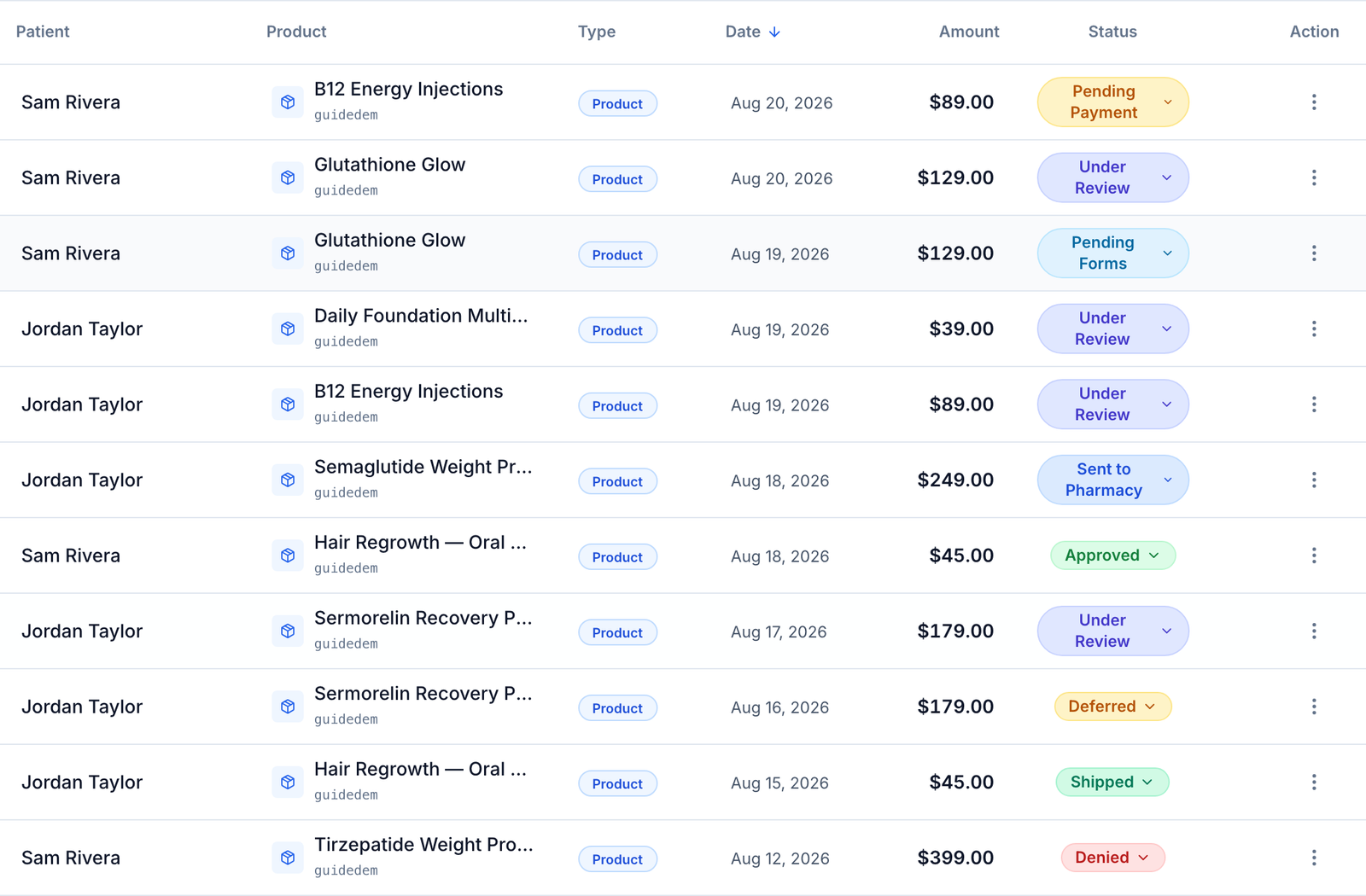
Words and statuses
Every word and every status badge a Client Admin or Client Staff account can see, defined in one place.
This is the dictionary for the whole Clients guide set: every word you will meet, and every status badge a Client Admin or Client Staff account can see, with what it means and who has to move next.
Questions people ask about this page
An order says Pending. Is that normal?
Usually yes — it means the order exists and nothing has happened yet. But one held state also renders as Pending: pending_fee, a lab order frozen because a GEN Health lab processing fee failed to charge. You can tell them apart on /orders: the held one shows under the filter pill Pending (Processing) and puts an amber banner at the top of the page reading "N orders on hold — a $X processing fee is due." The Orders table further down this page defines both.
Why does the same patient show a different status to me than to the provider?
Because "Status" is two different fields. Client Admin and Client Staff see the raw account status — Active, Pending, Deactive, Archived, Deceased. Providers and Provider Network Admins see a derived action status — Active, Account Setup Required, Forms Required, Sync Visit Required, Archived. Both are correct; they answer different questions.
A prescription failed. Does the patient know?
No. Every error-like prescription and order status is rewritten to Processing before a patient sees it, with the line "Your care team is finishing this up. We will update you as soon as it moves." The one exception is a declined card on a stored-payment order, which the patient sees as Payment issue, because only they can fix it.
What is the difference between Denied and Deferred?
Denied means the provider declined; it is terminal and nothing further happens automatically. Deferred means the provider wants more information or a live visit; the patient can still move forward by booking or answering. Neither status refunds the patient by itself.
Can I create my own statuses?
Yes, for orders only. Settings → Orders lets you add up to 20 custom order statuses. They are labels: they never move money, never send anything to a pharmacy or lab, and no automation reads them. See Settings — Orders.
Why is a grey badge sometimes bad news?
Because grey is the fallback colour for any status the badge component does not recognise. Incomplete, Past Due, Uncollectible, Void and Revoked all render grey — the same grey as Archived. Read the word, not the colour.
My badge is not on this page. Where did it come from?
When a status has no entry in a label map, the app title-cases the raw database value and shows that. So awaiting_lab_purchase renders as "Awaiting Lab Purchase". If you see a badge that is not defined here, it is almost certainly a raw value being displayed directly.
A word I need is not here. What do I do?
Use the "Ask a question" chat on any guide page, or open a ticket from Support in the left menu. See Support and tickets.
Where to find it
This guide is not a screen in the app. It is the reference the other guides link to. The statuses below appear on /orders, /patients, /prescriptions, /labs, /forms, /products, /billing, /messages, /support, /integrations and /settings/developers. Visible to: Client Admin, Client Staff.
Three rules that save time. 1. Read the word, not the colour. 2. The same database value gets different labels on different screens — always trust the screen you are looking at. 3. For every status, ask "who is blocked?" — the patient, your team, the provider, the pharmacy, or a vendor. The tables below answer that in the last column.
Part 1 — Words
Who is who
| Word | What it means |
|---|---|
| Client | Your brand. You own the storefront, prices, products, forms, and patients. In the app your account type is Client Admin or Client Staff. |
| Provider network | The separate company whose licensed clinicians review your patients and write prescriptions. You link to one; you do not employ the clinicians. |
| Practice | A third kind of tenant on the platform — a bricks-and-mortar clinic with its own calendar and front desk. Not relevant to a Client account. |
| Provider | A licensed clinician at the provider network who reviews a patient and decides. |
| Provider Delegate | A non-prescribing assistant who prepares work for a named provider. They cannot make the final clinical decision. |
| Client Admin | Your role if you can change setup: branding, payments, products, team, settings. |
| Client Staff | The daily-work role: patients, orders, messages, forms. Cannot change setup, and has only one settings tab. |
| Super Admin | The GEN Health platform team. They can see across tenants; you cannot. |
| Affiliated client | A child brand created under your account. Platform charges for it bill to you. See Affiliated clients. |
| OnlyScripts | The pharmacy service that fills and ships medication. Shipment and fulfillment problems go to OnlyScripts, not to GEN Health. |
Your account model
| Word | What it means |
|---|---|
| Client model | Which of three shapes your account runs in. It decides which pages exist for you. |
Review Only (gfe_only) | Clinical review without prescribing or selling. Billing, Formulary, Labs, Messages, Orders, Prescriptions and Products are removed from your menu. |
Review + Prescribe (gfe_prescribe) | The full storefront. You take payment; the network prescribes. |
| Affiliate | You sell products the network owns, and payment runs through the network's processor instead of yours. |
| Platform fee | What GEN Health charges you to use the platform. Paid with your account payment method, which is separate from the card patients pay with. |
| Lab processing fee | A per-lab-order charge GEN Health adds on top of the lab price. If it fails, lab orders are held. |
Clinical words
| Word | What it means |
|---|---|
| Protocol | The network's clinical rulebook for one condition: which questions are asked, whether a live visit is needed, which states are excluded, which medications may be prescribed. |
| GFE (good faith exam) | The clinical evaluation a provider must complete before prescribing. On this platform it is either an async review or a live visit. |
| Async visit | No live call. The patient answers questions; a provider reads them later and decides. |
| Sync visit | A live video appointment at a booked time. |
| Chart review | The provider's read of one patient's answers and history, ending in Approve, Deny, or Defer. |
| Intake form | The health questionnaire a patient completes at checkout. |
| Consent form | A form the patient signs rather than answers. |
| Formulary | Your medication menu: which medicine, at which pharmacy, at what price. |
| Pairing | One row of the formulary — one product linked to one medicine at one pharmacy. |
| Marker / Panel (lab) | A marker is one thing a lab measures. A panel is a group of markers ordered together. |
| Recency rule | How old a lab result may be and still satisfy a product's lab requirement. Set on the network's protocol, not on your Labs page. |
Money and commerce words
| Word | What it means |
|---|---|
| Payment processor | The company that moves patient card payments to your bank. Stripe, Authorize.Net, NMI, SimPay, SlidePay, Square, or Whop. |
| None (test mode) | The processor choice that takes no real money. Checkout links still open, but no card is ever charged. This is the state people mean when they say "demo mode". |
| Storefront | The page patients browse and buy from. |
| Checkout link | A direct URL to one product's checkout. Works even when the product is hidden from the storefront. |
| Hosted checkout | A ready-made GEN Health checkout page your own website can send a shopper to, or embed in an iframe. |
| Promo code | A discount code a patient types at checkout. |
| Patient code | A personal discount code issued to one named patient. |
| Void | Cancel a card authorisation before the money settles. No refund is needed because nothing settled. |
| Refund | Send settled money back to the patient. |
| Request payment | A manual invoice: an order you create so a patient can pay for something outside normal checkout. |
| UTM parameters | Tags added to a link so you can see which ad or email produced a sale. |
Developer words
| Word | What it means |
|---|---|
| Server key | A secret API key for your own backend. Sent as X-API-Key. Never put it in a web page. |
| Storefront key | A public key safe to use in browser code, sent as X-Storefront-Key. Only works from origins you allow-list. |
| Allowed origin | A website address a storefront key is permitted to be used from. |
| Webhook | A signed message GEN Health posts to your server when something happens — an order paid, a prescription sent. |
| Signing secret | The value your server uses to prove a webhook really came from GEN Health. |
| Request log | The record of API calls made with your keys and webhooks delivered to your endpoints. |
| SDK | A small code package that mounts GEN Health checkout inside your own React or plain-JavaScript page. |
Part 2 — Statuses, grouped by where you see them
Each table gives the label you actually read on the screen, what it means, and who has to act. Where the app shows a different word for the same thing elsewhere, the row says so.
Orders — the status badge on /orders
| Status | What it means | What to do |
|---|---|---|
| Pending | The order exists and nothing has happened yet. Also the resting state of a paid lab before it is dispatched. | Wait, or check the payment. If the amber processing-fee banner is showing, this row may be a held lab — see Pending (Processing). |
| Pending Payment | The patient has not paid. | The patient pays, or your team sends a reminder from the row menu. Patients see this as Ordered; the patient Billing page calls it Unpaid. |
| Pending, filter pill Pending (Processing) | The patient paid, but a GEN Health lab processing fee failed, so the lab order is held and never reached the lab. | Pay the fee from the amber banner ("N orders on hold — a $X processing fee is due") using Pay $X now or Manage card. The patient does nothing. |
| Pending Forms | Paid, but required intake or consent forms are unfinished. | The patient completes the forms. Patients see Forms Needed; the patient profile Labs tab calls the same thing Awaiting Forms. |
| Pending Labs | Paid, forms done, but a required lab result is missing. | The patient orders or uploads a lab. Patients see Labs Needed. |
| Awaiting Lab Purchase | The required lab has not been bought at all yet. | The patient buys the lab. |
| Pending Review | Waiting for a provider to pick it up. | Nothing on your side. The network claims it. Patients see Evaluation. |
| Under Review | A provider has the chart open. | Wait. Patients see Evaluation. |
| Approved | The provider approved. | The prescription dispatches, or the patient pays the medication half on an assessment-first order. |
| Denied | The provider declined. Terminal. | Nothing happens automatically, including no refund. Patients see Not Approved. |
| Deferred | The provider wants more information or a live visit. | The patient books a sync visit or answers follow-ups. Patients see More Info Needed. |
| Sent to Lab | The lab order reached the lab or connector. | Wait. This one status covers the whole kit journey, so it can sit here for days. |
| Results Received | Lab results are back and stored. | A Client Admin clicks Review Results then Mark as Reviewed. Client Staff see Awaiting review and cannot act. |
| Awaiting Lab Review | A paid lab is parked for your sign-off before it is sent, because your account turned lab-order review on. | Client Admin opens Review lab and chooses release, change, or cancel. No other status edit is accepted on this order. |
| Results Awaiting Review | A patient uploaded their own result PDF and it is waiting for a human. | Client Admin or Client Staff opens Review uploaded result and accepts or declines it. |
| Lab Results Reviewed | Someone attested they read the results. Terminal for a lab order. | Nothing. |
| Sent to Pharmacy | The prescription was transmitted. | Wait for tracking. |
| Processing | The pharmacy is filling it. | Wait. |
| Pending at Pharmacy | The pharmacy returned a bare "pending" with no detail, so the app stops claiming it was sent. Display only — it is never stored. | Wait, or refresh the pharmacy status. |
| Shipped | It left the pharmacy. | Track it. |
| Delivered | It arrived. | Nothing. The patient's own timeline still says Shipped at this point. |
| Purchase Complete | The money settled and the order's job is done. | Nothing. Patients see Paid. |
| Pharmacy Order Failed | The pharmacy rejected the prescription or never received it. | Open the prescription, read the cause tooltip, fix it and resubmit. Patients see Processing. |
| Error | A generic failure. | Open a support ticket. Patients see Processing. |
| Cancelled | The order was cancelled. It never refunds by itself. | Issue a refund separately if money moved. |
| Refunded / Partially Refunded / Voided | Money went back, in part or in full, or an authorisation was cancelled before capture. | Nothing. |
| Preparing your order | Patient-facing only. A prescription is queued while your team checks pricing, so the patient has not been asked to pay. | Client Admin or Client Staff authorises the payment prompt. |
| Pay for product | Patient-facing only, on assessment-first orders. The assessment is paid and approved; the medication is not. | The patient pays the product half. |
| Your own custom labels | Whatever you named it in Settings → Orders. Display only. | Nothing — no automation reads it. |
Client Admin and Client Staff can only set these statuses by hand: Pending, Pending Payment, Shipped, Delivered, Error, Pharmacy Order Failed, and your own custom labels — plus Purchase Complete on a Request-payment invoice. Everything else is written by the system. The dialog says it plainly: "Status changes may require confirmation. Labels do not mark orders paid or send to pharmacy or lab."
Orders — the payment column
Payment is a second, separate field. It is allowed to disagree with the order status, and a captured payment always wins.
| Status | What it means | What to do |
|---|---|---|
| Paid | Money captured. | Nothing. |
| Unpaid | Nothing captured yet. | Send a reminder, or check the checkout. |
| Partially Paid | One half of a two-part order captured — typically the visit, not the medication. | Wait for the second charge, or prompt it. |
| Partially Refunded / Refunded / Voided / Cancelled | As labelled. | Nothing. |
Orders — the type badge (not a status)
Lab · Form Request · Visit · Bundle · Package · Product · My product (a product you own rather than the network) · Request payment (a manual invoice). These say what kind of order it is, not where it is.
Patients — the Status column on /patients
| Status | What it means | What to do |
|---|---|---|
| Active | A normal account. | Nothing. |
| Pending | Created or invited, never approved. | Only a Super Admin can approve. Raise a ticket if a patient is stuck here. |
| Deactive | Switched off. This is the platform's word for blocked or disabled — there is no separate "blocked" flag. | Open the patient profile and choose Activate. |
| Archived | Removed from the working list, not deleted. | Nothing. Note that providers see a deactivated patient as Archived too, because their view has no word for "Deactive". |
| Deceased | Set by hand. | Nothing. |
Your "Needs attention" filters use different words again: Onboarding required, Forms required, Telehealth visit required. Those match the provider-side badges Account Setup Required, Forms Required and Sync Visit Required.
Prescriptions — /prescriptions
| Status | What it means | What to do |
|---|---|---|
| Queued for review | Your account asked to check the prescription before the patient is charged. | Client Admin or Staff authorises it. |
| Awaiting patient payment | Written, but the patient must pay before it goes out. | The patient pays. |
| Saved | Written and stored, not transmitted. | Submit it, in manual submission mode. |
| Sending | Transmission in flight. | Wait. |
| Sent to pharmacy / Submitted to pharmacy | Transmitted. | Wait for tracking. |
| Pending | The pharmacy has it and nothing has moved. | Wait, or refresh the pharmacy status. |
| Pharmacy processing / Processing | Being verified or filled. | Wait. |
| On Hold | The pharmacy paused it. | Contact the pharmacy, or raise an OnlyScripts ticket. |
| Action Required | The pharmacy needs something from you. | Hover the warning triangle for the cause, then act. |
| Need Clarification | The pharmacy asked a question. | Answer it. |
| Cancellation Requested | Somebody asked the pharmacy to cancel. | Confirm with the pharmacy. |
| Cancelled / Cancelled by Admin | Cancelled. Patients see plain Cancelled either way. | Nothing. |
| Voided | Cancelled before dispatch, usually by "Fix & resubmit". | The replacement prescription carries on. |
| Shipped / In Transit / Delivering / Delivered | Carrier stages. | Track it. |
| Delivered to pharmacy / Received | It reached the pharmacy, not the patient. | Wait. |
| Failed / API Submission Failed / Error | Submission failed. | Hover the warning triangle. The tooltip names the cause and the fix — a missing DEA number, a state the pharmacy does not ship to, a licence gap, or sandbox mode. Then resubmit. |
| Payment Failed / Payment Successful | The pharmacy-side charge declined or captured. | For a decline, update the payment method the pharmacy holds. |
| Expired / Discontinued / Not Processed | Terminal states: the script aged out, therapy stopped, or nobody picked it up. | Ask for a rewrite, or resubmit. |
| Completed / Active / Approved | Accepted by the vendor, or a current medication on the patient's list. | Nothing. |
Labs — /labs, the Orders table, and the patient profile Labs tab
A lab has more than one status at once: the coarse order status above, plus a kit shipping phase, plus the requirement state on the product order that is waiting for it.
| Kit phase | What it means | What to do |
|---|---|---|
| Kit Ordered | The kit order is placed. | Wait. |
| Preparing Kit | The lab is registering and packing it. | Wait. |
| Shipped to Patient | On its way to the patient. An email goes out automatically. | Track it. |
| With Patient | Delivered. The patient must collect the sample. An email goes out automatically. | Chase the patient if it stalls here. |
| Returning to Lab | The sample is on its way back. An email goes out automatically. | Wait. |
| Received at Lab | The lab has the sample. | Wait. |
| Partial Results | Some markers are back, the lab is still working. | Wait. |
| Results Ready | All results are in. | Review them from the order. |
| Shipping delay | An overlay, not a phase: the carrier reported a delivery problem. | Check carrier tracking. |
| Kit could not be delivered | An overlay: the kit or sample could not be processed. | Contact the patient and reorder. |
Kit phases exist only for at-home test kits from the Junction connector. A walk-in draw, an at-home phlebotomy visit, or a kit from another connector shows only Sent to Lab for the whole journey. On the patient profile Labs tab that same status is rendered Sent To Lab, with a capital T.
On the product order that is waiting for a lab, the patient's roadmap reads Labs needed, then Labs ordered, then Results under review if they uploaded their own PDF, then Reviewed once your team accepts it. A lab result document itself shows Ready in a grey badge, and a Patient source badge when the patient uploaded it.
Forms — /forms
| Status | What it means | What to do |
|---|---|---|
| Draft | A form definition that is not live. | Finish it and set it Active. |
| Active | Live and usable. | Nothing. |
| Inactive | Retired. Existing submissions are kept. | Reactivate if you need it again. |
| Pending (Patient submissions) | A submission is queued for your team to read. This is what drives the red count on the Forms item in the left menu. | Click Review. |
| Reviewed | Somebody opened and acknowledged the answers. | Choose Request forms, Queue prescription, or No action. |
| Actioned | Terminal — a prescription draft or other action was taken. The row shows Prescription queued instead of buttons. | Nothing. |
| Dismissed | Terminal — somebody chose No action. | Nothing. |
| In progress (public form drafts) | Somebody started your public form link and has not submitted. | Nothing; it disappears when they submit. |
| 0/3 done, 1/3 done, 3/3 done | Progress on a form request you sent a patient, on the patient profile Forms tab. | Re-send or cancel the request from the same card. |
Products — /products
| Status | What it means | What to do |
|---|---|---|
| Active | Sellable. There is no badge on the row; the filter pill is how you see it. | Nothing. |
| Inactive | Off. Shown as small grey text under the name, not a badge. Checkout links are disabled with the tooltip "Activate this product before sharing checkout links." | Activate it from the row menu. |
| Hidden from storefront | Active but not browsable. Direct checkout links still work. | Tick the Storefront checkbox to show it. |
| No badge at all, but no patient can see it | A network product with no customer price set never appears in the patient storefront, and nothing on screen says so. | Set a price in the config view. |
There is no stock or inventory concept anywhere in the product. Nothing is ever "out of stock". The only availability limit is the excluded-states list on a product.
Billing and invoices — /billing and Settings → Account and billing
| Status | What it means | What to do |
|---|---|---|
| Draft | An invoice that was never finalised. Excluded from history and totals. | Nothing. |
| Open / Unpaid | Finalised and owed. | Pay it, or use Charge now. |
| Past Due | Overdue. Renders grey, not amber — do not read the colour as "fine". | Pay it. |
| Paid | Settled. | Nothing. |
| Processing | The invoice is being created at the processor. | Wait, then refresh. |
| Payment Failed | The charge did not go through. | Fix the card, then retry. |
| Missing Payment Method / Missing Billing Email / Missing Customer / Missing Processor | Account billing cannot proceed because a piece of setup is absent. | Add the card, the billing contact, or the missing configuration in Settings → Account and billing. |
| Void / Uncollectible / No Charge | Cancelled, written off, or zero-total. | Nothing. Note that Uncollectible is still counted as outstanding. |
| Due $X / Paid $X / Active plan / No payment recorded / Billed via parent / No payment due | The account standing pill. "Billed via parent" appears on an affiliated client. | Act only on "Due". |
Processor transaction rows show the processor's own word, lowercase and unpolished — succeeded, requires payment method. Saved payment methods have no status at all: the only badge is Default, and there is no expired or declined badge.
Communication logs — Settings → Logs
This table shows the email and SMS vendors' own words, title-cased: Queued, Accepted, Sending, Sent, Delivered, Received, Undelivered, Failed, Skipped. Undelivered and Failed both mean the message did not arrive. Received means an inbound message from a patient. See Settings — Logs.
Developers — Settings → Developers
| Status | What it means | What to do |
|---|---|---|
| Active (API key) | The key works. | Nothing. A storefront key shows its status in lowercase — active — while a server key shows Active. |
| Revoked | The key was switched off. Any integration using it stopped immediately. | Create a new key and update the integration. |
| Legacy | The single old credential from before named keys existed, shown as "Legacy API key". It cannot be renamed or regenerated. | Move to a named key, then revoke it. |
| Enabled / Disabled (webhook endpoint) | On or off. A disabled endpoint receives no deliveries. | Toggle it from the row menu. |
| Auto-paused | The platform paused the endpoint after repeated failures. | Fix the endpoint, then re-enable it and use Send ping. |
| Delivered / Failed / Pending / Published / Skipped (paused) | One webhook delivery attempt. | Open the delivery for attempts, HTTP code, and the next retry. |
| Success / Warning / Error / Unknown (Request Log) | The HTTP class of one API call. Warning means a 4xx: your request was rejected. | Open the row and read the response body. |
Integrations — /integrations
Active means on and routable. Incomplete means the credential fields exist but are empty — and it renders grey, so it is easy to miss. Disabled means switched off for your account. Archived means retired. Pharmacy coverage is separate and computed: All 50 states, or {n}/50 states with a "Does not ship to:" tooltip.
Custom portal domains and email sending domains use their own five words: Waiting for DNS, DNS verified, Activating, Active, Needs attention. The email domain has no "Activating". See Branding, URL, and custom domain.
Support tickets — /support
| Status | What it means | What to do |
|---|---|---|
| Submitted | Raised, not yet picked up. | Wait. |
| Processing | The recipient is working on it. | Wait. |
| Response Requested | They need an answer from you. Older tickets store this as "Action Required" and are relabelled on screen. | Reply inside the ticket. |
| Complete | Resolved. | Nothing. |
| Cancelled | Withdrawn. | Nothing. |
Priority reads Informational / Request, Standard / Normal, or Critical / Blocker in the form, and Low / Medium / High in the table. Same three values.
Messages — read and unread
An unread conversation has a bold thread name and a red dot before the row, with the title "Unread messages". A filled red dot means the patient wrote last and nobody has replied ("Awaiting provider reply"); a hollow red ring means a provider has replied. The left menu shows a red count on Messages, capped at 99+. Your own outbound messages show Sending, Sent, Delivered, Seen, or Failed. Threads can also be suffixed · Muted or · Archived.
Part 3 — Statuses that mislead people
Every case below is real. If you are debugging something confusing, check here first.
| What you see | What is really going on | How to tell |
|---|---|---|
| Pending on a lab order | It may be pending_fee — the order is frozen because a GEN Health lab processing fee failed to charge, and it was never sent to the lab. The patient also just sees "Pending". | The amber fee banner on /orders, and the filter pill Pending (Processing). A third name, Held fee, appears in the Orders action filter. |
| "Review" everywhere | Five unrelated reviews appear in the same Orders table: approving a lab before it is sent, accepting a patient's uploaded PDF, marking connector results as read, the parent order parked while that happens, and the provider's clinical review. | Read the exact wording: Awaiting Lab Review, Results Awaiting Review, Results Received, Results under review, Pending Review. |
| Awaiting review with no button | You are Client Staff looking at something only a Client Admin can act on. | Ask a Client Admin. |
| Four different "results" words | Results Ready is a kit phase, Results Received is the order status, Results Awaiting Review is an uploaded PDF waiting for you, Results under review is the parent order waiting for that. Two of them share the same green. | Read which table you are in. |
| A patient says nothing is wrong, but you see an error | Patients never see failure states. Every error-like status becomes Processing for them. | Expected behaviour. Tell them directly if they need to act. |
| A delivered order that says Shipped to the patient | The patient timeline maps delivered to "Shipped". | Trust your own table. |
| A deactivated patient reading as Archived | The provider-side status list has no entry for "Deactive", so it falls through to the Archived fallback. | Check the patient profile header, which shows the true value. |
| Incomplete or Past Due in calm grey | Neither has a colour mapping, so both render in the same grey as "Archived". | Read the word. |
| Lowercase statuses | Several tables print the raw database value: affiliated clients show active, storefront keys show active, processor transactions show requires payment method. | Nothing is broken; the label map simply has no entry. |
| A No Show filter that always reads zero | Nothing in the system writes "No Show" on a GEN visit. A provider no-show is recorded on a separate field while the visit stays Confirmed. | Ignore the filter unless a human set it by hand. |
| Two spellings of cancelled | GEN records spell it Cancelled; Stripe records spell it Canceled. Canceling means "will cancel later", not "cancelled". | Check which table you are reading. |
What can go wrong
| What you see | Why | Fix |
|---|---|---|
| A badge that is not in this guide | The status has no label mapping, so the raw database value is being title-cased and shown. | Treat the words literally, and raise a ticket if it blocks work. |
| You cannot set the status you want | Most statuses are system-written. Your picker only offers Payment, Delivery, Other, and Custom groups. | Fix the underlying cause instead — pay the fee, complete the forms, resubmit the prescription. |
| An order sits with no visible error | Something upstream is unresolved and does not surface on the row: a held processing fee, a lab awaiting review, or an incomplete shipping address. | Open the order detail and read the timeline. |
| A patient's status will not change | An active-but-not-onboarded patient cannot be archived, by design. | Finish onboarding first, or deactivate instead. |
| You expect an approval workflow for network products and there is none | Catalog access is granted "off and hidden": the product arrives inactive with no price. | Activate it and set a customer price in /products. |
Next
Was this helpful?