
Integrations
Why OnlyScripts is already connected, the API key popup, the pharmacy card (Update OnlyScripts payment method), your own pharmacy account, which pharmacy fills by state, lab vendors and EMR tools.
Integrations lists the pharmacies, lab vendors and practice tools your account uses. Left menu → Integrations. Client Admin makes changes; Client Staff can only view it.
What you can do here
- Check the OnlyScripts connection (the API key popup)
- Add or update the pharmacy card
- Control which pharmacy fills by state
- Use your own pharmacy account
- Turn on a lab vendor
- Send visit notes to your EMR
Check the OnlyScripts connection
Use this when a popup asks for an OnlyScripts API key, or you wonder why OnlyScripts is connected.
Look under Pharmacies
A tick after OnlyScripts account, under Pharmacies, means you're connected. OnlyScripts routes each prescription to the pharmacy. GEN Health created the account when your first Client Admin finished account setup.
Leave the key alone
Clicking OnlyScripts account opens OnlyScripts credentials. Saved beside OnlyScripts API Key means nothing is needed: click Cancel, never Delete.
If setup isn't finished
A Finish OnlyScripts setup box means no key is saved. Raise a GEN Health ticket; use Connect OnlyScripts account only with a key they give you.
You'll know it worked when the tick shows next to OnlyScripts account and pharmacy rows are listed.
Who can do this: Client Admin. Client Staff don't see the OnlyScripts line.
Add or update the pharmacy card
Use this before your first prescription, or when an order stops with Payment information needs updating. This card pays pharmacies for medication.
Open it
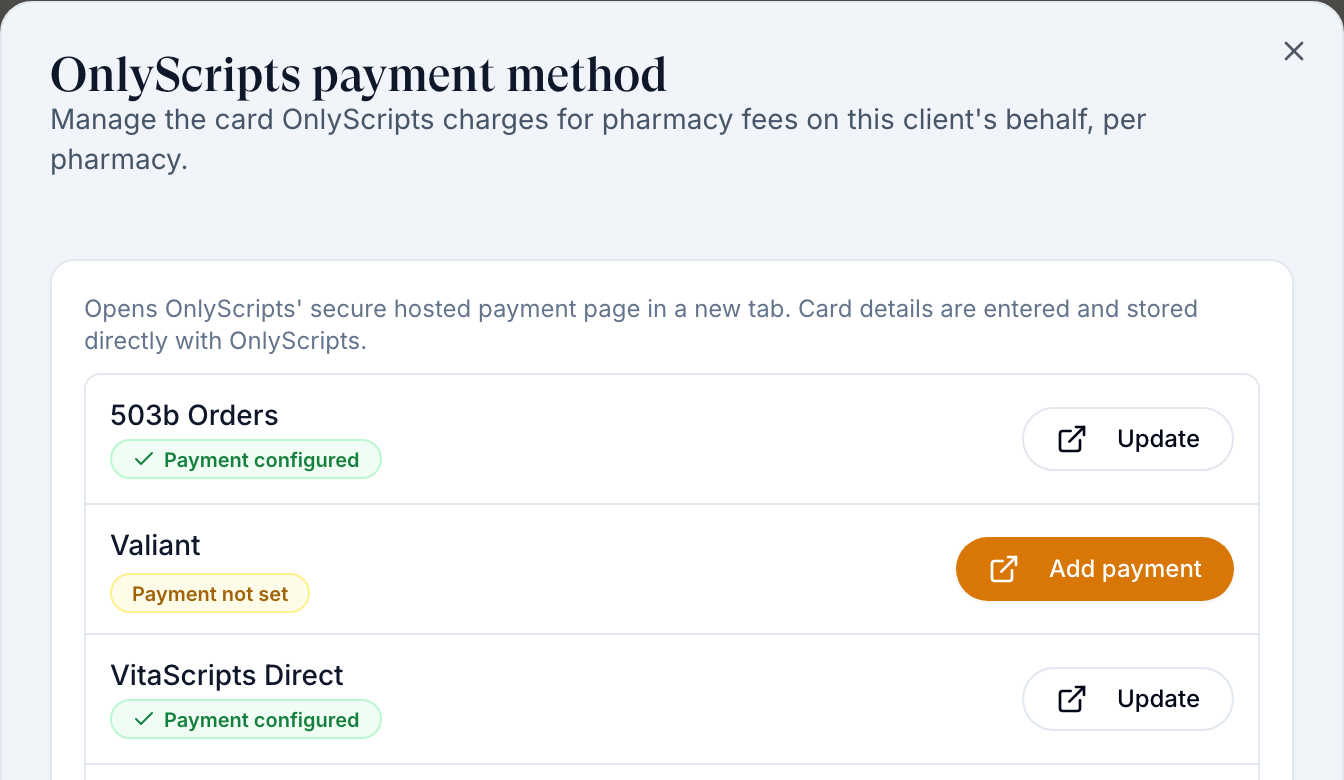
Click Update OnlyScripts payment method, top right of Pharmacies.
Find the pharmacy
Each pharmacy reads Payment configured or Payment not set; OnlyScripts keeps a card per pharmacy.
Add the card
Click Add payment (or Update). OnlyScripts' secure page opens in a new tab; enter the card there.
Check it
Close the tab and reopen the dialog.
You'll know it worked when the pharmacy reads Payment configured. Prescriptions that already failed don't retry by themselves: see Prescriptions.
Who can do this: Client Admin; Client Staff don't get this button. Fix payment on the Dashboard Payment needed alert opens the same card page.
Control which pharmacy fills by state
Use this when a pharmacy doesn't ship to a patient's state, or you prefer one. The provider picks from the pharmacies paired with the product that ship to the patient's state.
Check coverage
Each pharmacy shows All 50 states or a count such as 49/50 states. Hover the count to see Does not ship to: and the states.
Switch off pharmacies you don't use
Turn off a pharmacy's switch so no one can send to it.
Find products with gaps
On Products, open the Formulary filter and pick Partial state coverage.
Pair a backup
On Formulary, pair each of those products with a second pharmacy that ships to the missing states.
Say which comes first
There's no automatic priority: tell your provider network which pharmacy to use first.
You'll know it worked when Partial state coverage no longer lists the product.
Who can do this: Client Admin.
A prescription sent to a pharmacy that can't ship to the patient's state isn't rerouted: the provider must void and resend it.
Use your own pharmacy account
Use this when you have your own pharmacy contract. Get its API credentials from your rep first.
Open the key
Click the key icon on the pharmacy's row. The dialog is {Pharmacy} credentials.
Paste and save
Fill each field and click Save credentials.
You'll know it worked when the key icon turns green (Pharmacy credentials saved).
Who can do this: Client Admin.
A pharmacy that requires your own account, such as Boom Rx, can't be switched on until its credentials are saved (Add Boom Rx credentials before enabling it.). OnlyScripts did not return credential requirements for this pharmacy means there's no own-account option: ask GEN Health.
Turn on a lab vendor
Use this before you sell lab panels.
Switch it on
Under Labs, turn on the vendor's switch: BioReference, CRL, Labcorp, Quest or USSL.
Build the panels
Go to Labs and activate the panels you'll sell.
You'll know it worked when Labs offers that vendor's panels.
Who can do this: Client Admin. GEN Health decides which vendors appear; lab fees go on your GEN Health card.
Send visit notes to your EMR
Use this to post signed provider notes to a system under Tools, such as DrChrono or Jane.
Switch it on
Turn on the tool's switch. If a toast says Add {tool} credentials to finish enabling it., go on to the next step.
Add credentials
Click Credentials on the row, paste the key from that system and click Save credentials.
You'll know it worked when the switch stays on with no credentials prompt.
Who can do this: Client Admin. Tools come from your primary provider network, which also sets up ScriptSure. Once ScriptSure is connected, its dialog is titled ScriptSure team; an account that can't be changed there shows a Read only badge, and a failed load offers Try again.
What can go wrong
| What you see | Why | Fix |
|---|---|---|
| Verification failed. Credentials were saved. | The values were stored, but the vendor did not accept them. | Update the values and save again to retry verification. Partial credentials saved. Add remaining required fields to verify. means a required field is still empty. |
| Unable to load the webhook API key. Close and reopen this integration. | An integration that sends webhooks (Strive) shows a Webhook API key in its details; it did not load. | Close the integration and open it again. When the key loads, click Copy webhook API key; the toast reads Webhook API key copied. |
| A popup asks you to add the OnlyScripts API key | It's the saved-key dialog; the key was created for you. | Click Cancel. If Finish OnlyScripts setup shows, raise a GEN Health ticket. |
| Dashboard Payment needed: Payment information needs updating for a pharmacy | That pharmacy has no card, or the card was declined. | Add the card, then retry the prescription. |
| A warning triangle next to a pharmacy | Not enabled in OnlyScripts: prescriptions can't route there. | Raise a GEN Health ticket. |
| Fix payment says you don't have access to the pharmacy | Known problem on the OnlyScripts side. | Raise an OnlyScripts ticket on Support with the order. |
| A pharmacy you want isn't listed | It isn't on your OnlyScripts account, or isn't connected yet. | Raise a GEN Health ticket, or introduce the pharmacy to GEN Health by email (about 1–2 weeks). |
| Provider can't pick your pharmacy, or sees only Manual entry | The product isn't paired, or its pharmacy doesn't ship to that state. | Pair a pharmacy that ships there. |
| The pharmacy asks for keys you don't have (a signing key, an NPI) | It needs your own account. | Get them from the pharmacy and save them. |
Questions people ask
Why is there an OnlyScripts account connected? We never signed up.
GEN Health creates it during account setup. It gives you the partner pharmacies listed here.
Where is my provider network on this page?
It isn't: Integrations has only Pharmacies, Labs and Tools. Your network shows in the Owner column on Products and as a card on Support. See Link your provider network.
Is the pharmacy card the same as my GEN Health payment method?
No. The pharmacy card (here) pays for medication; your GEN Health card (Settings → Account and billing) pays platform and lab fees; your processor (Billing) collects from patients.
Which pharmacy gets the prescription if several are paired?
The provider chooses among the paired pharmacies that ship to the patient's state. There's no automatic priority or fallback.
Related
Was this helpful?