
Settings — Account and billing
What you pay GEN Health: the card on file, a failed platform fee, the billing contact, your plan and lab processing fee, receipts, and agreement records.
Settings — Account and billing is where you manage what your business pays GEN Health: your plan, the card GEN Health charges, your billing contact, and every platform charge. It is not where patients pay you; that's Billing and Settings → Payments. Left menu → Settings → Account and billing. Client Admin only. Not shown on review-only accounts.
What you can do here
- Add or change the card GEN Health charges
- Clear a failed platform fee
- Change the billing contact
- Check your plan and fees
- Find a charge or receipt
- See who accepted the Terms, Privacy Policy and BAA
Add or change the card GEN Health charges
Use this before launch, when your card expires, or when a platform charge fails.
Open the payment method
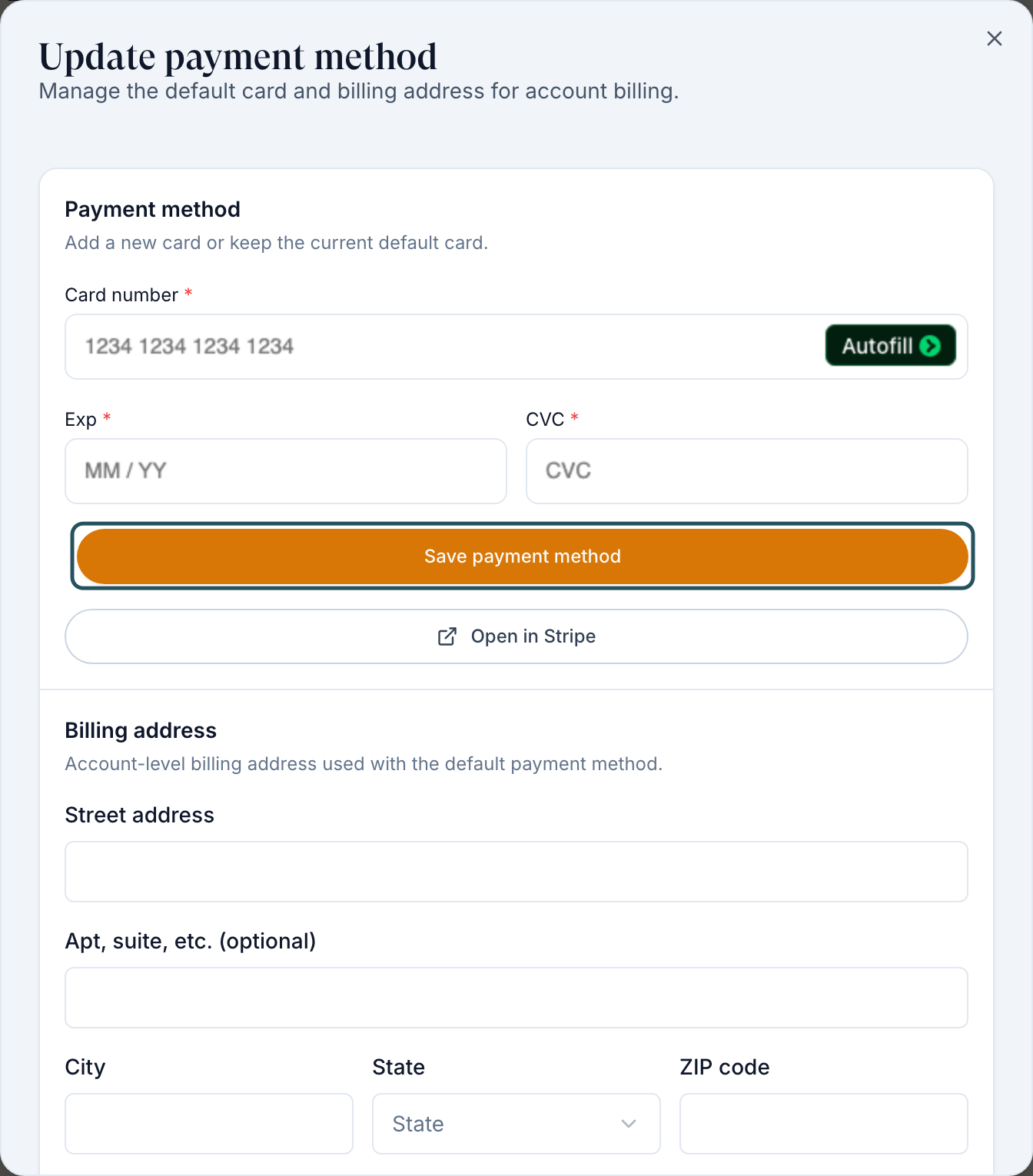
In Overview, click the value next to Payment method (None on file or your card). The Update payment method dialog opens.
Save the card, then the address
Enter Card number, Exp and CVC, then click Save payment method. Under Billing address, fill Street address, City, State and ZIP code, then click Save billing address; it's a separate save. Open in Stripe opens Stripe's own billing page instead.
You'll know it worked when the toasts read Payment method updated and Billing address updated, and the rows show your card and address.
Who can do this: Client Admin.
Clear a failed platform fee
Use this when a red bar at the top of every page reads Your latest platform fee failed to process. It appears when GEN Health couldn't charge your card for a lab order's processing fee, and those lab orders are held until it's paid.
Open the card form
Click Update payment method on the red bar, or use this page's Payment method row.
Save a working card
Enter the card and click Save payment method. The held fees are retried on it straight away.
You'll know it worked when the red bar disappears and the fee row in Payments changes from Failed. Held lab orders then go to the lab.
Who can do this: Client Admin. Fix it before the date on the bar to avoid account suspension.
Change the billing contact
Use this when someone else should receive GEN Health billing emails, for example when the account changes owner.
Pick the admin
In Overview, open Billing contact and choose a Client Admin. Only Client Admins are listed; invite the person as a Client Admin from Dashboard → Users first if they're missing.
You'll know it worked when the toast reads Billing contact updated.
Who can do this: Client Admin.
Check your plan and fees
Use this to see what GEN Health charges your account.
Read Plan details
Plan details lists your Subscriptions, Usage billing, Lab processing fee (charged on top of each lab's price) and, if your provider network pays for you, Network billing. No active subscriptions or usage pricing. means nothing is attached yet.
You'll know it worked when each plan shows its status, such as Active, Trial or Billed via network.
Who can do this: Client Admin can read it. Plan changes, cancellations and pricing corrections are made by GEN Health: raise a ticket in Support to GEN Health.
Find a charge or receipt
Use this to match a charge on your card statement.
Search or filter
In Payments, type in Search payments or references…, or use All statuses and All payment types (Subscription, Usage, Lab, One-time). Filters appear once there's more than one value to pick.
Open the receipt
Use the Receipt column. A dash means there's no receipt for that row. Export CSV downloads the list.
You'll know it worked when the row's Reference (for example an order number) matches the charge.
Who can do this: Client Admin.
See who accepted the Terms, Privacy Policy and BAA
Open the record
Next to Agreements, click View agreements. The table lists Agreement, User name, Email, Date, Time and PDF.
You'll know it worked when you see each acceptance. No agreement records yet. means nobody has accepted during account setup.
Who can do this: Client Admin.
Statuses you'll see here
| Status | What it means | Who acts next | What you do |
|---|---|---|---|
| Paid | Settled | No one | Nothing |
| Open / Unpaid / Past Due | Not paid yet | You | Make sure a working card is saved |
| Failed | The charge was declined | You | Save a new card (above) |
| Processing | Being created at the processor | GEN Health | Wait, then Refresh |
| Billed via network (plan) | Your provider network pays GEN Health for you | No one | Nothing |
| Any other status | A billing record GEN Health has to fix | GEN Health | Raise a ticket in Support |
What can go wrong
| What you see | Why | Fix |
|---|---|---|
| You updated the card but the payment-failed bar stays | The retry hasn't finished, or a known problem kept the old flag | Reload the page. If the bar is still there, raise a ticket in Support to GEN Health. |
| Your plan shows the wrong amount | Plans are set by GEN Health | Raise a ticket in Support with the agreed price. |
| A prescription says payment failed, but nothing failed here | Pharmacy charges go to the card in Integrations, not this one | Integrations → update the OnlyScripts payment method, then resend the prescription. |
| The card saved but Billing address still reads None saved | Card and address are separate saves | Click Save billing address too. |
| The person you want isn't in Billing contact | Only active Client Admins are listed | Invite them as a Client Admin first. |
Questions people ask
Does the card in our billing profile also pay for pharmacy fulfillment?
No. This card pays GEN Health platform fees only. Pharmacy orders through OnlyScripts are charged to the payment method saved in Integrations.
What are GEN Health's platform fees, and when do they start?
They're set in your agreement with GEN Health and appear under Plan details once attached. For start dates or amounts, raise a ticket in Support to GEN Health.
How do we transition the account to a new owner?
Invite the new owner as a Client Admin, then choose them in Billing contact and have them save their card.
How does billing work between us and our provider network?
Your network bills you directly for its services, and pharmacies bill for medication. This page only shows what GEN Health charges. If it reads Billed via network, your network pays your GEN Health plan.
Why can't I edit my plan?
Plan details is read-only for clients. GEN Health makes plan changes; ask through Support.
Related
Was this helpful?